Restructuring USG’s website around product discovery and role-based personalization
USG’s website served architects, contractors, and distributors looking for products, assemblies, and technical resources. USG wanted to assess the existing experience and explore how personalization could better support these user groups.
I synthesized research and behavioral data, defined the information architecture, and designed navigation, search, filtering, personalization, and product-detail experiences to improve product and resource discovery.
Role
UX Designer
Team
PM, Lead Design Strategist, UX Researcher
Timeline
February – April 2025 · 12 weeks
Contributions
Heuristic evaluation, site map and navigation structure, page-level design recommendations, stakeholder presentation, alignment workshops
Problem context
Finding specific products and technical resources remained difficult, even when users knew what they needed
Across analytics, tree testing, and research, the pattern was consistent: users often knew what they needed, but the site's structure made products, tools, and technical resources difficult to locate.
86%
Homepage drop-off
Users exited the homepage without navigating to other pages.
Source: GA4 path analysis
2%
List-to-detail page conversion
Of active users who visited the Wall Assemblies list page, only 2% continued to an assembly detail page.
Source: GA4 path analysis
36%
Tool-finding task success rate
20/55 users successfully located tools relevant to their role.
Source: Tree testing
Who we designed for
Different workflows, shared discovery needs
I synthesized user research to identify what each role needed and where those needs overlapped. This informed which content to emphasize by role and which resources to keep shared.
Work context
Design-build team
Architects / interior designers
Start with a concept, then identify how to build it
Concept design
Explore ideas before choosing products.
Material selection
Evaluate appearance and technical suitability.
Project documentation
Incorporate selected products into drawings and specifications.
Research finding
The Project Gallery offered inspiration but did not connect concepts to relevant products.
Design implication
I recommended linking inspirational content to relevant products and technical resources, supporting material selection and project documentation.
Contractors
From project specifications to installation
Material selection
Identify suitable products from project specifications.
Submittal creation
Gather product data sheets to prepare submittals.
Material installation
Consult assembly information and installation guidance.
Research finding
Product data sheets were central to submittal preparation, while assembly and installation guidance supported work on site.
Design implication
I recommended making product data sheets, assembly information, and installation guidance easy to reach from relevant products, supporting both submittal preparation and on-site work.
Distributors
From customer requirements to product orders
Project requirements
Understand customer needs and project requirements.
Product selection
Compare technical attributes and gather documentation.
Quote and order generation
Check pricing and availability, then prepare quotes and orders.
Research finding
Distributors needed technical information to evaluate products, alongside pricing and availability to support quoting and ordering.
Design implication
I recommended helping distributors compare technical attributes and access product documentation to assess fit against customer requirements.The workflow includes needs beyond USG’s website; it does not represent delivered website functionality.
Shared resources, role-specific starting points
Keep products, documents, and tools shared, with role-specific homepage content providing relevant starting points.
Products, technical documents, and tools supported all three user groups. I used this overlap to recommend shared navigation with role-specific content emphasis on the homepage.
Design principles
Three principles guided the redesign
01
Reduce competing paths to shared resources.
02
Support both known-item retrieval and exploration.
03
Personalize where audience needs diverge; standardize where they overlap.
Solutions
Connect product discovery to the work users needed to complete
Across roles, users needed to find products, evaluate their suitability, and access technical resources. Their starting points differed, but much of the underlying information was shared.
I translated these needs into a proposed site structure and page-level requirements, combining shared navigation and product resources with role-specific homepage content. Stakeholder reviews challenged the navigation options and the scope of personalization, bringing usability, implementation, and ongoing maintenance into the decisions.
01: Information architecture
Create one predictable path to shared products and resources
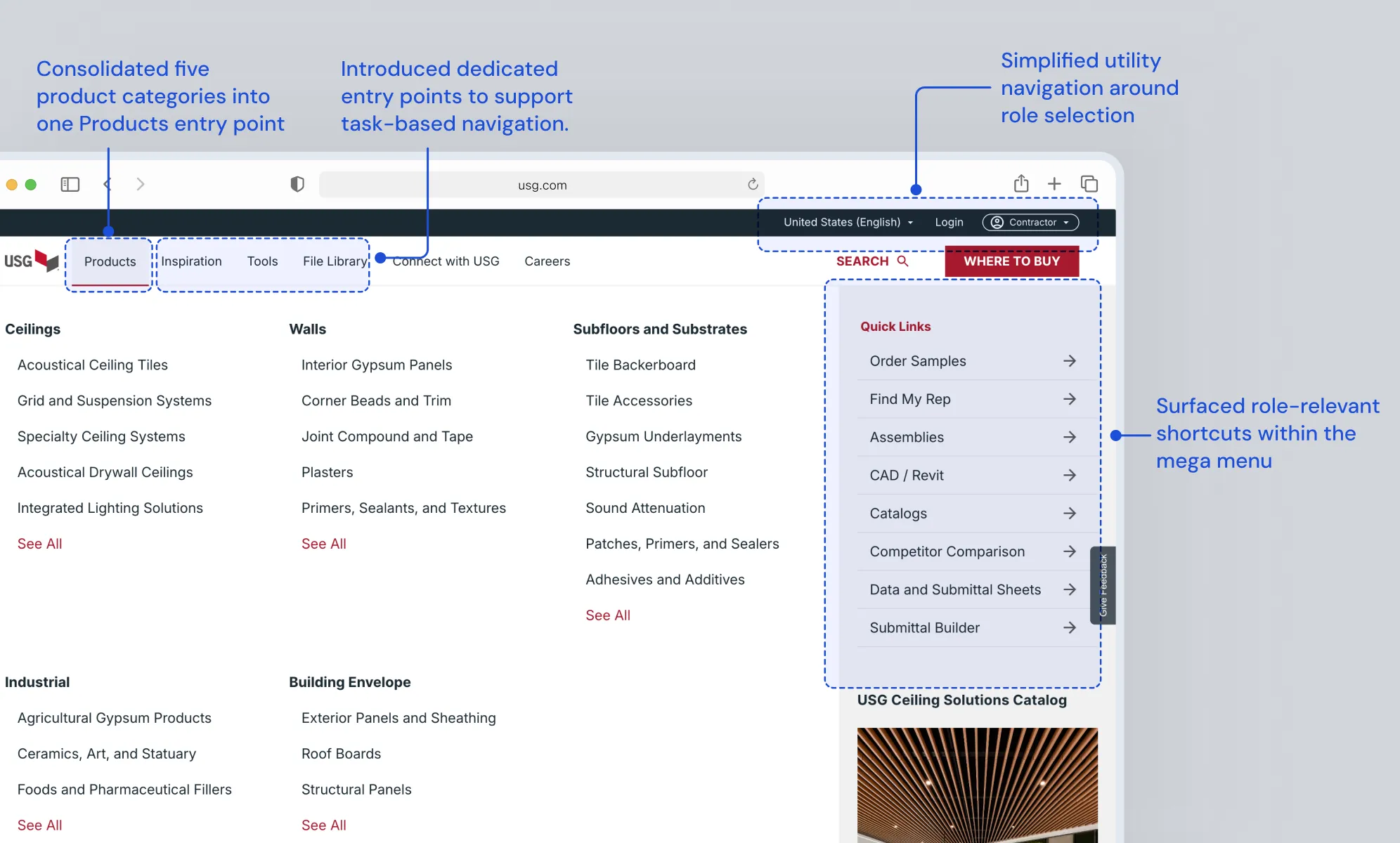
Products and technical resources used across roles were split across competing top-level paths. I created a consolidated Products structure so users could follow one predictable route while preserving access to the underlying categories.
BeforeAfter
Simplifying the IA meant giving up top-level visibility
Marketing wanted product categories prominent; I grouped them under Products to reduce top-level competition while preserving visibility.
Validating site map
I created the sitemap alternatives. When stakeholder reviews didn't produce a clear preference, we moved the decision into tree testing rather than choosing through internal opinion.
02: Search & filtering
Support both direct lookup and product comparison
Users either searched for something specific or narrowed options using technical criteria. I prioritized relevant product results in search and introduced category-specific filters so users could compare products using attributes that mattered to the task.
BeforeAfter: SearchAfter: Filters
03: Curation and personalization
Personalize the starting point, not the entire experience
The design build team, contractors and distributors had different priorities, but relied on many of the same products, tools, and resources. I personalized homepage imagery, quick links, and tools by role while keeping navigation and product experiences shared to avoid unnecessary content duplication and maintenance.
Product category specific filters
Improve filtering experience on the product list pages by showing the product attributes users actually needed to evaluate and compare options.
Limiting personalization to the homepage
Extending personalization to navigation, product pages, and tools would increase content maintenance despite overlapping user needs. I recommended keeping these experiences shared, accepting less tailoring deeper in the site to maintain one consistent resource base.
Personalization did not scale across every product
We explored role-specific document links in each product detail page. Stakeholders flagged the maintenance burden of curating them across a large product catalog.
04: Product detail pages
Bring technical decisions closer to the product
After finding a product, users still needed to evaluate fit and access supporting technical information. I brought key specifications, options, documents, and resources together so architects, contractors, and distributors could move from discovery to decision more easily.""
BeforeAfter: Quick viewAfter: Product detail page
Useful for users, difficult to scale
We explored linking imagery to exact products, finishes, and data sheets. The pattern reduced ambiguity but required ongoing manual curation across a large catalog, so we chose not to scale it.
Validation and adoption
The structure tested better and moved into the redesign
We used tree testing to evaluate the proposed navigation against key findability tasks before adoption. The navigation was validated and became part of the redesign.
USG’s design team also used our page-level requirements and design principles to inform the new homepage, search, filtering, global navigation, and product-detail experience.
My engagement concluded before post-launch behavioral metrics were available, so I use validation results and design adoption as the evidence of impact.
Reflection
What I’d change next time
Validate the decisions with the widest impact
The IA influenced every downstream experience. I learned to test structural decisions early, before investing further in page-level design.
Not every user group needs a different experience
Designing for three roles taught me to separate truly different needs from shared ones, and personalize only where it adds meaningful value.