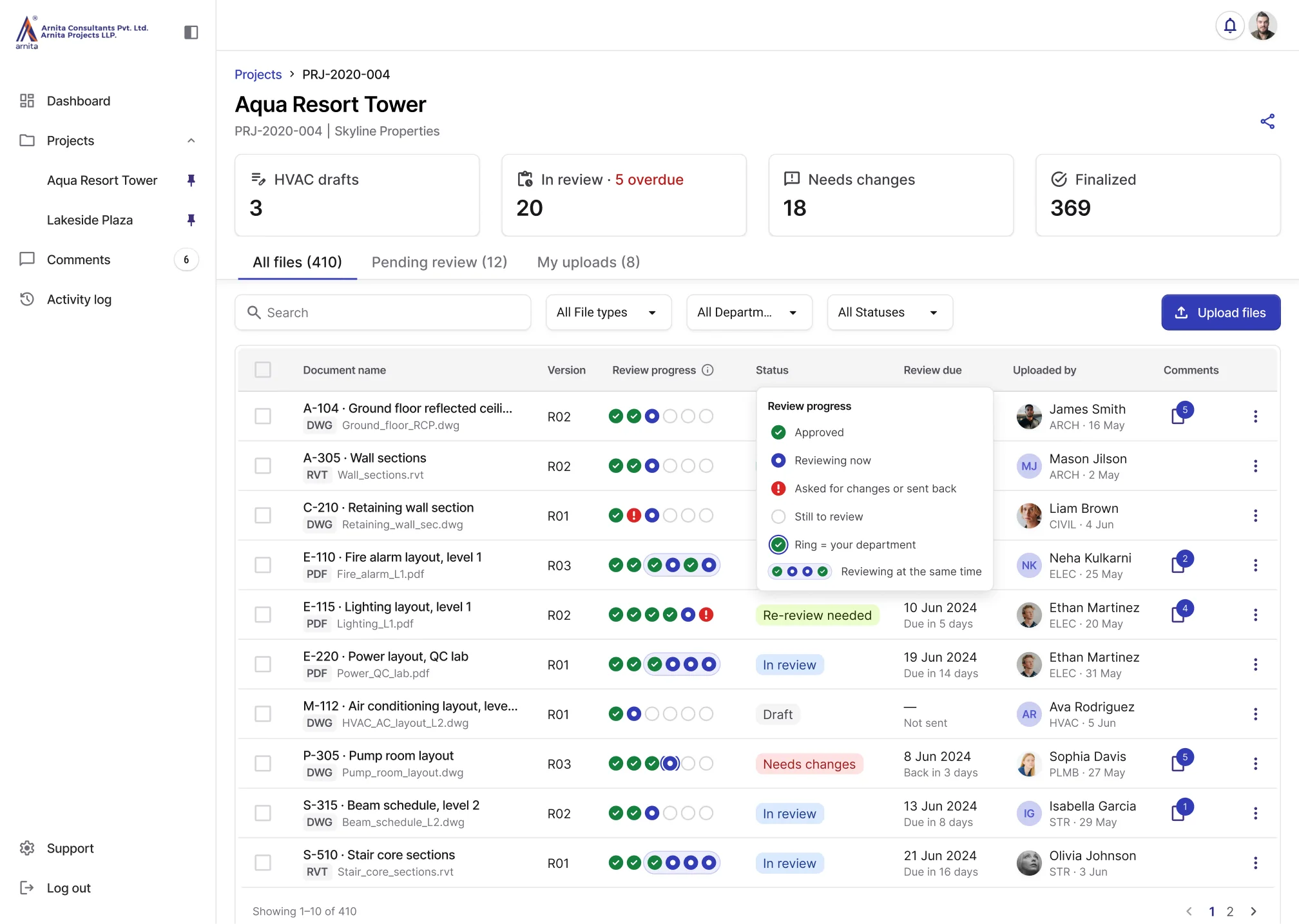
Arnita files dashboard showing status, review progress and due dates for each drawing

The files dashboard: status, review progress and due dates in one table.

Building a document management system that reduced drawing review time by ~75% across all six departments

Arnita Consultants designs and executes large-scale manufacturing factories. Six architecture and engineering departments review and approve technical documents across 12-15 active projects at a time.

As the sole product designer, I designed their first document management system from research through delivery and trained the departments at launch.

Role
Sole Product Designer
Team
1 PM, 2 Engineers, 6 Department Leads, 1 CEO
Timeline
32 weeks (0–1 MVP)
Contributions
Problem scoping, User research, Information architecture, MVP prioritization, High-fidelity prototypes, Component library, Stakeholder alignment, Developer handoff, Department training
Problem context

Teams struggled to identify the current drawing version, who was reviewing it and whether it was approved.

Across six departments, teams compared files and called uploaders to confirm the current drawing version. With no shared view of review ownership or progress, they relied on calls to track reviews.
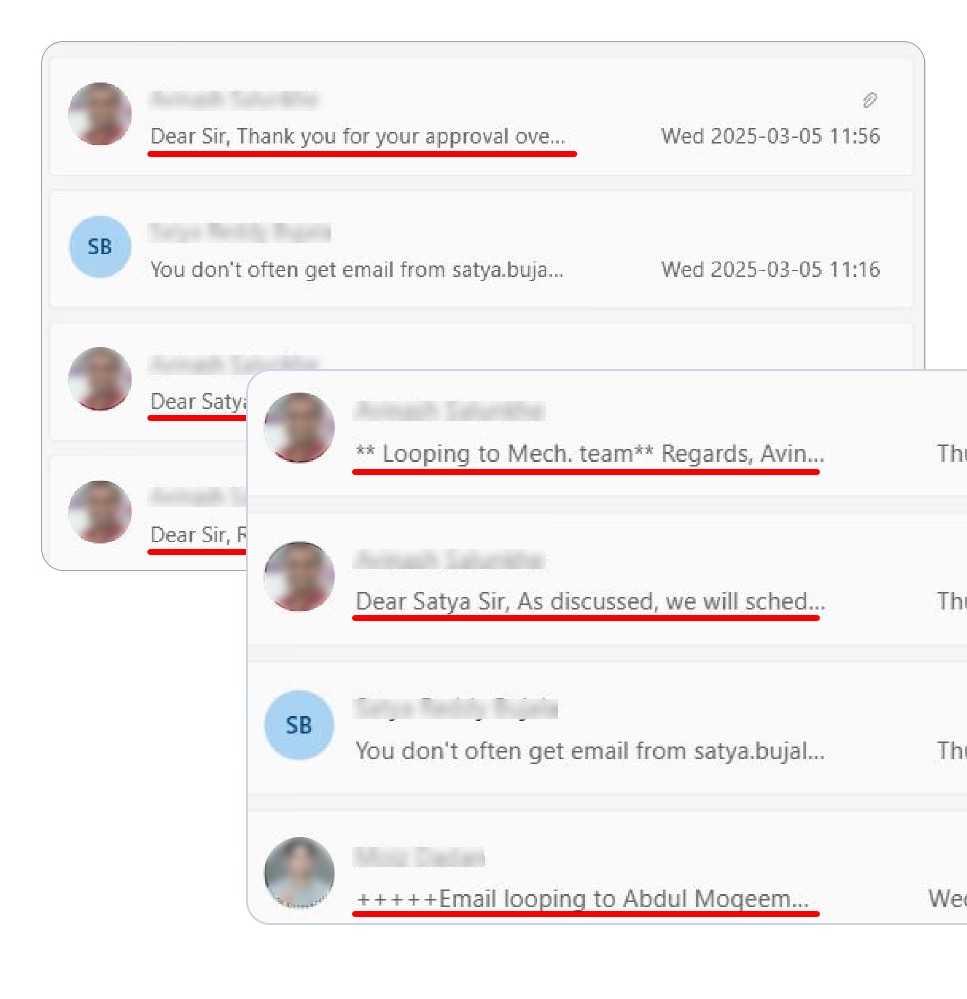
Email thread showing drawing review coordination

Review coordination via email

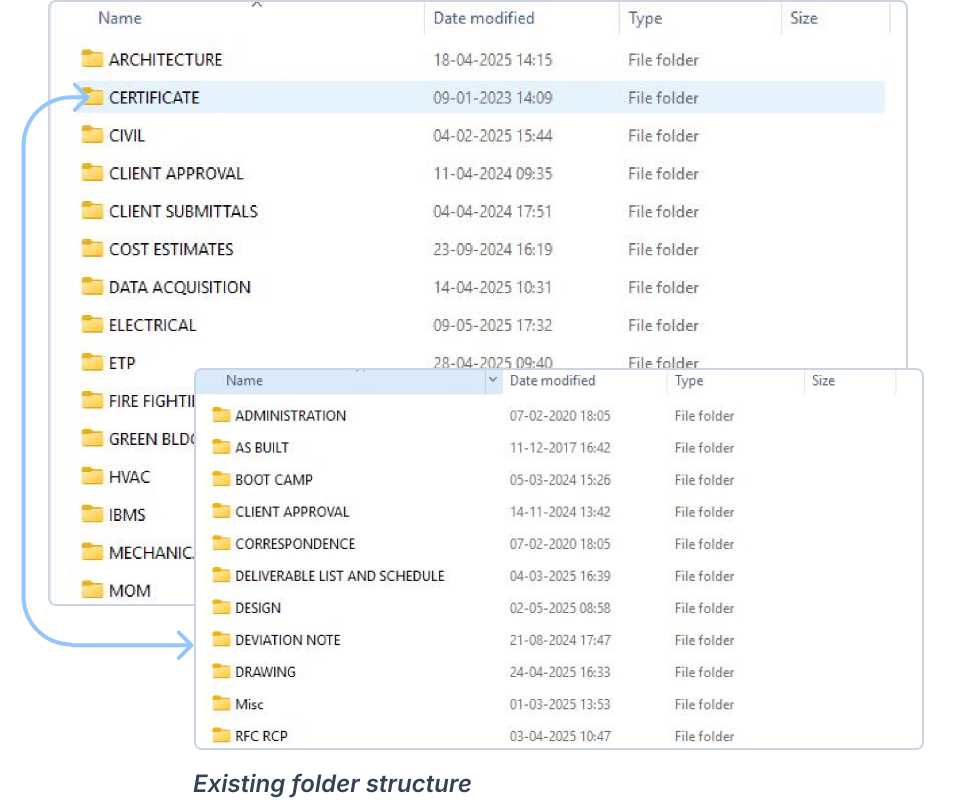
Folder structure with duplicate files found during shadow sessions

A complex project folder structure

Process

Interviews, shadowing and a folder audit showed where drawing reviews stalled.

I interviewed department leads, observed drawing reviews and audited shared folders to understand how teams identified versions, handed off reviews and tracked feedback.

Stakeholder interviews

I interviewed department leads to understand review handoffs, responsibilities and how they tracked progress.

Shadow sessions

I observed how reviewers found drawings, compared files and confirmed the current version with authors.

Folder audit

I examined folder structures, file names and revision records to understand how current documents were organized across departments.

Workflow mapping

Every review depended on information held in separate files, messages and people’s memory.

I mapped the review process using interviews, shadow sessions and a folder audit to identify friction in three core tasks: finding the right version, tracking handoffs and checking revisions.

Reviewer
checks a drawing and gives feedback
Drawing author
supplies the drawing and revises it
Department lead
involved when a drawing goes through the author’s department
  • Action
  • Decision or route choice
  • Observed issue

01 · Finding the right version

Reviewers compared three to five files and contacted authors to confirm which version to review. The lack of a clear version reference added verification effort before review could begin.

Finding 01: Finding the right versionExisting workflow, before redesign. The reviewer searches project folders, opens candidate files and compares versions. If the current version is clear, they review it. If not, they ask the drawing author to confirm, the author identifies the intended version, and only then can the review begin. Observed issue: the review depends on the author's confirmation.Existing workflow · Before redesignLocateCompareConfirmBegin review→→→ReviewerDrawingauthorSearch projectfoldersOpen candidatefiles andcompare versionsCurrent versionclear?Ask author toconfirmIdentify theintended versionReview theconfirmeddrawingYesNo!Review depends on author confirmation

Existing workflow · Before redesign

  1. ReviewerSearch project folders
  2. ReviewerOpen candidate files and compare versions
  3. ReviewerCurrent version clear?
  4. Yes
    No
    1. ReviewerAsk author to confirm
    2. Drawing authorIdentify the intended versionObserved issue: Review depends on author confirmation
  5. ReviewerReview the confirmed drawing

02 · Tracking ownership and progress

Drawings moved through department leads or directly between teams. Without visible ownership and review status, users relied on email and phone follow-ups to understand who needed to act next.

Finding 02: Tracking ownership and progressExisting workflow, before redesign. The drawing author prepares a review request and chooses a route: through their own department lead, who receives the drawing and hands it on, or directly to another department. Either way, a reviewer in another department receives the drawing. Later, the author asks about receipt or progress, and the reviewer responds by email or phone. Observed issue: responsibility is difficult to track.Existing workflow · Before redesignPrepareRouteReceiveFollow up→→→DrawingauthorDepartmentleadReviewer inanotherdepartmentPrepare reviewrequestWhich reviewroute?ReceivedrawingReceive drawingfor reviewAsk aboutreceipt orprogressRespond byemail or phoneThroughown leadDirect todepartment!Responsibility difficult to track

Existing workflow · Before redesign

  1. Drawing authorPrepare review request
  2. Drawing authorWhich review route?
  3. Through own lead
    1. Department leadReceive drawing
    Direct to department

    Both routes reach the reviewer

  4. Reviewer in another departmentReceive drawing for reviewObserved issue: Responsibility difficult to track
  5. Drawing authorAsk about receipt or progress
  6. Reviewer in another departmentRespond by email or phone

03 · Keeping feedback in context

Reviewers pieced together comments from markups, emails and calls to check revised drawings. Separating feedback from its revision increased the effort needed to verify whether issues were resolved.

Finding 03: Keeping feedback in contextExisting workflow, before redesign. The reviewer reviews the drawing, records markups, and shares comments and a decision. The drawing author receives the feedback in separate records, then revises and resubmits the drawing. The reviewer has to reconstruct the earlier feedback before checking the revision against it. If further changes are needed, the cycle starts again. Observed issue: earlier feedback must be reconstructed.Existing workflow · Before redesignReviewReturn feedbackReviseReview again→→→ReviewerDrawingauthorReview drawingand recordmarkupsShare commentsand decisionReceive feedbackin separaterecordsRevise andresubmit drawingReconstructearlier feedbackCheck revisionagainst feedbackIf further changes are needed!Earlier feedback must be reconstructed

Existing workflow · Before redesign

  1. ReviewerReview drawing and record markups
  2. ReviewerShare comments and decision
  3. Drawing authorReceive feedback in separate records
  4. Drawing authorRevise and resubmit drawing
  5. ReviewerReconstruct earlier feedbackObserved issue: Earlier feedback must be reconstructed
  6. ReviewerCheck revision against feedback
  7. ↻ If further changes are needed: back to “Review drawing and record markups”
MVP scope

I put verification, review coordination and feedback history first, and deferred integrations.

I deferred external integrations because they introduced engineering dependencies, accepting manual uploads for the first release. I deferred live markup because departments could review at different times using persistent, version-linked comments.

Review coordination
  • Included: Flexible department routing
  • Included: Review progress
  • Included: Lead-only approval
  • Included: Change requests
Drawing intake
  • Included: Batch uploads
  • Included: AI-extracted drawing details
  • Included: Uploader verification
  • Included: Revision-conflict checks
Drawing feedback
  • Included: Version-linked annotations
  • Included: Blocking comments
  • Included: Resolution tracking
  • Included: DWG comment overlay export
  • Deferred: Live collaborative markup
Revision management
  • Included: Revision history
  • Included: Side-by-side comparison
  • Included: Revision overlays
  • Included: Fresh reviews for each revision
External integrations
  • Included: Manual document uploads
  • Deferred: BIM 360 and Procore synchronization
  • Included in the first release
  • Deferred
Solution

Teams could verify a drawing, see who had it and keep feedback with each revision in one place.

I designed a browser-based platform where teams could verify drawing details, coordinate department reviews and keep feedback connected to each revision.

The system had to preserve 4 review rules:

  • Senders chose the next department.
  • Every drawing reached all six departments.
  • Only department leads could approve.
  • Every new revision required fresh reviews.

REVIEW COORDINATION

Project overview

I surfaced workload, overdue drawings and items awaiting the reviewer’s department on project cards, helping teams prioritize reviews across 6–10 concurrent projects.
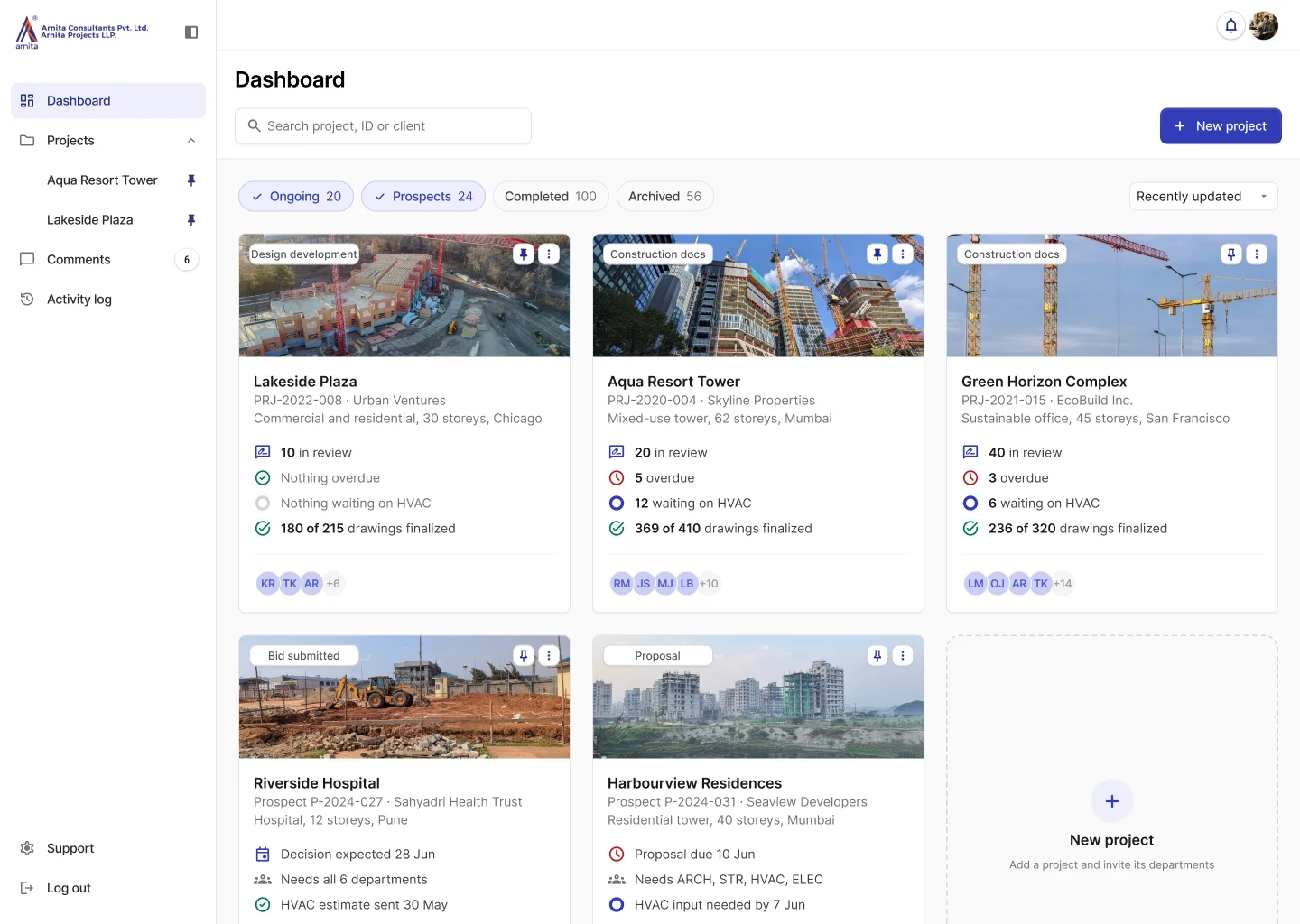
Projects dashboard with project cards, each showing drawings in review, overdue drawings, drawings waiting on HVAC and drawings finalized
Document list view

I combined document names, versions, review progress, status, due dates, uploader details and comments in a scannable list. Selecting a document opened its detailed overview.

Document overview

A department-level progress indicator showed completed, current and pending reviews. The drawing preview, details, comments and version history provided context for the review.
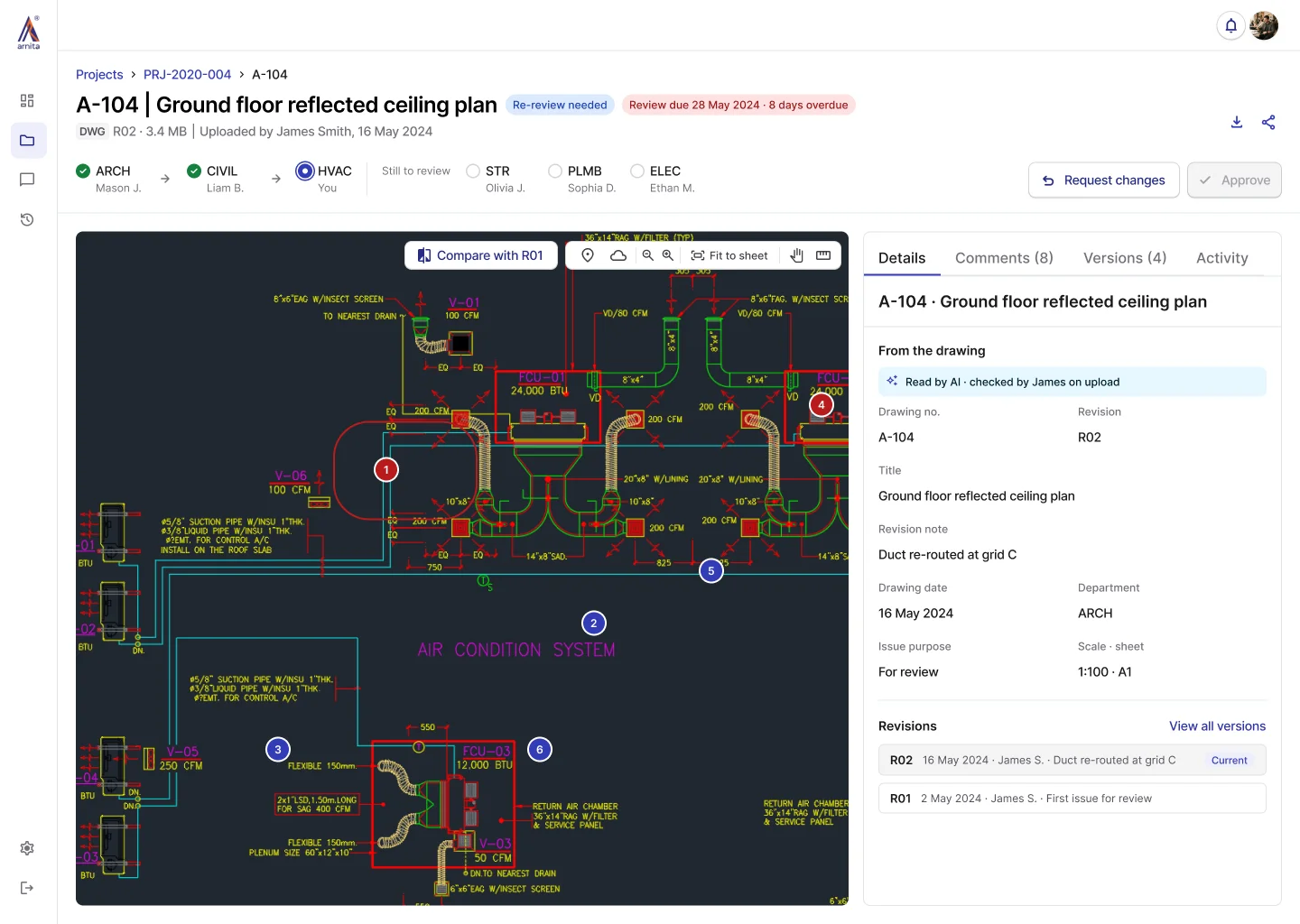
A-104 drawing overview with the review path ARCH, then CIVIL, then HVAC reviewing now, and the Details tab open

DRAWING INTAKE

Batch upload

The upload flow validates files independently, allowing drafters to resolve individual issues while the rest of the batch proceeds.

Drawing verification

The verification screen pairs the drawing preview with AI-extracted details from its title block: drawing number, revision and date. Uploader confirmation helps prevent incorrect versions from entering review, while an explained AI recommendation supports the choice of review department.
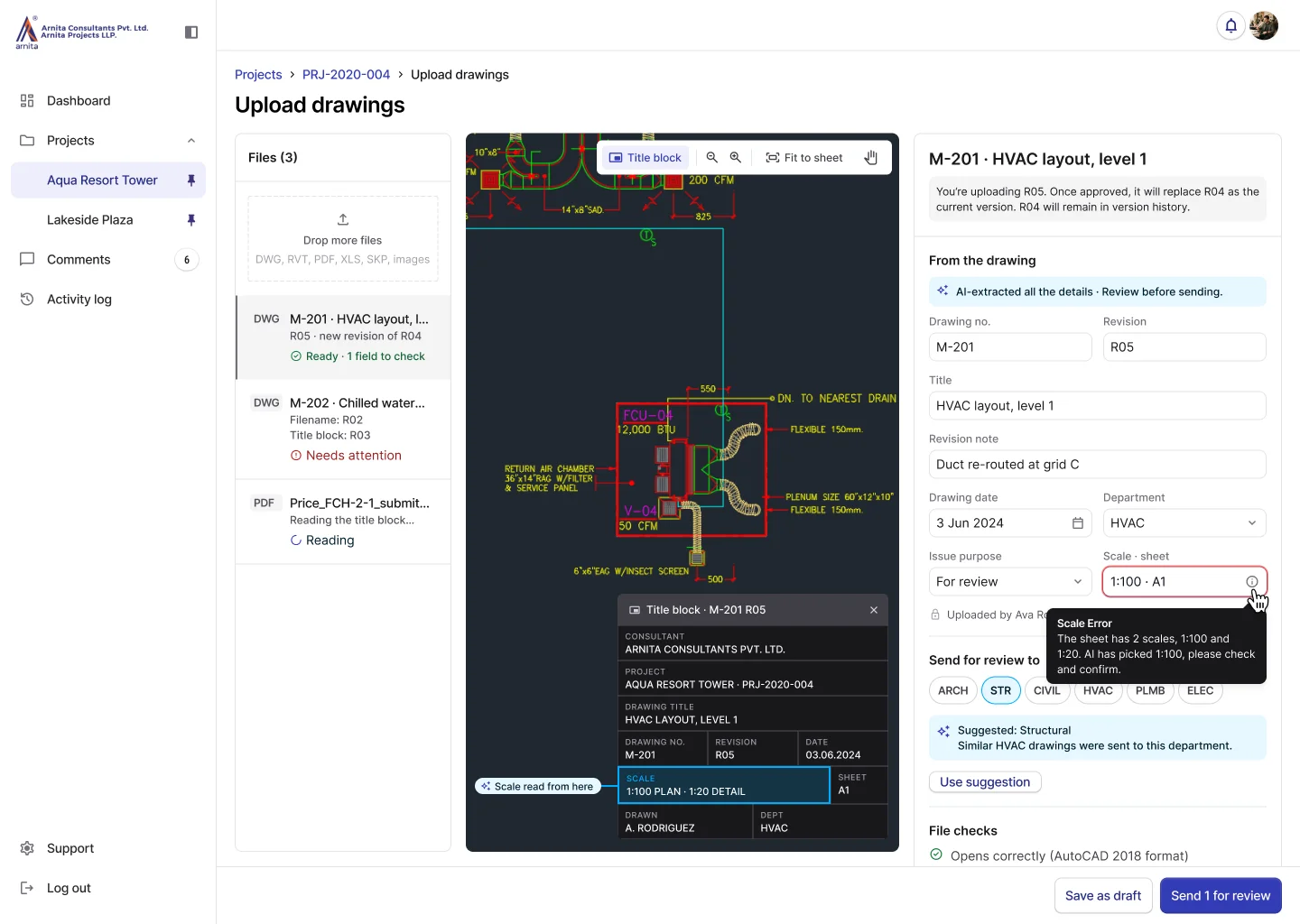
Upload page with the file list, the drawing preview with its title block, and the details read from the drawing, including a scale error tooltip and a suggested department to send it to
Upload exceptions

A conflicting revision label pauses only the affected file until the uploader confirms the right version. For unreadable scans, AI suggests an existing drawing to match, giving uploaders a starting point for resolving missing details. Other documents, such as PDFs and Excel sheets, get their details extracted and a suggested related drawing for the uploader to check.
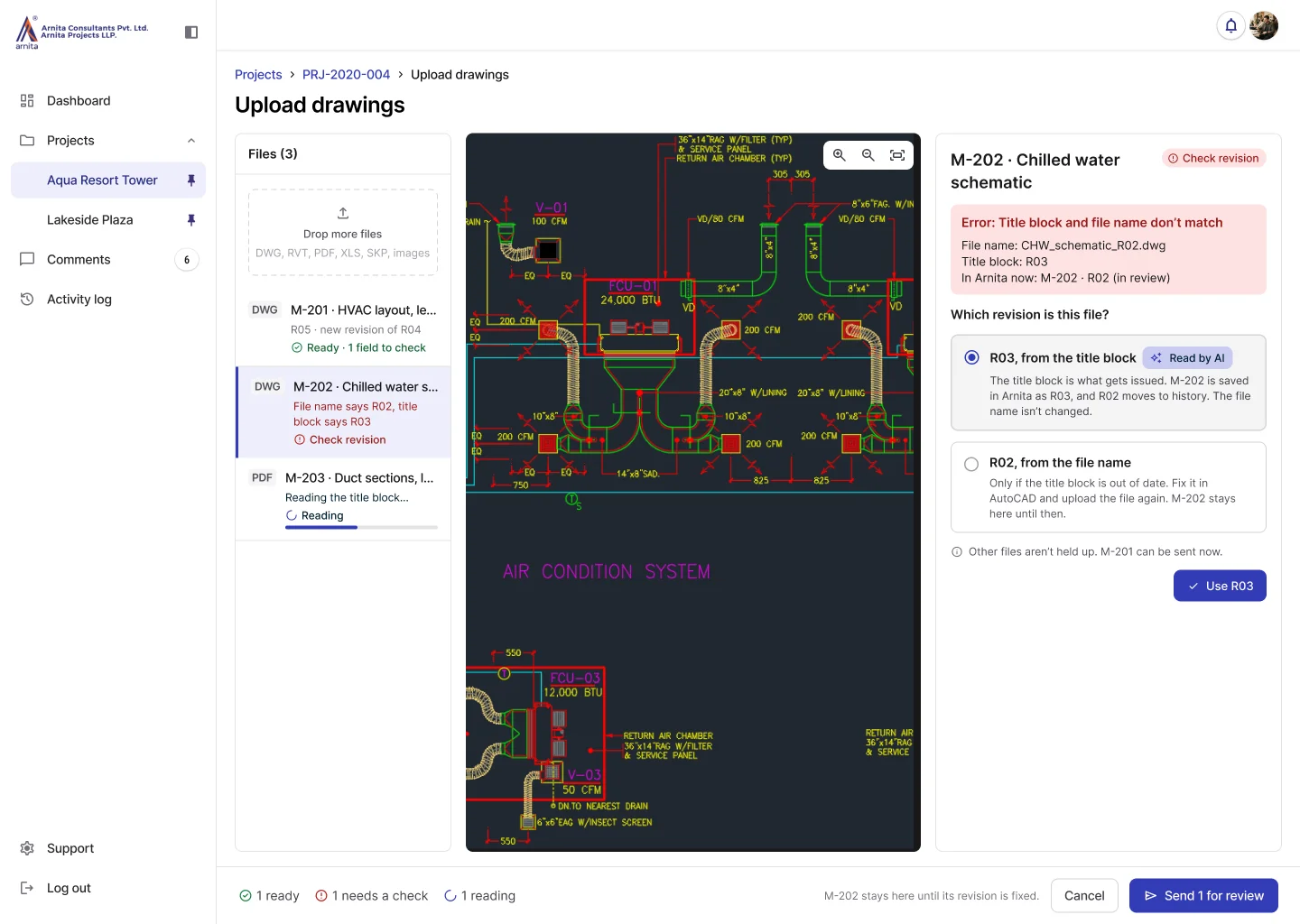
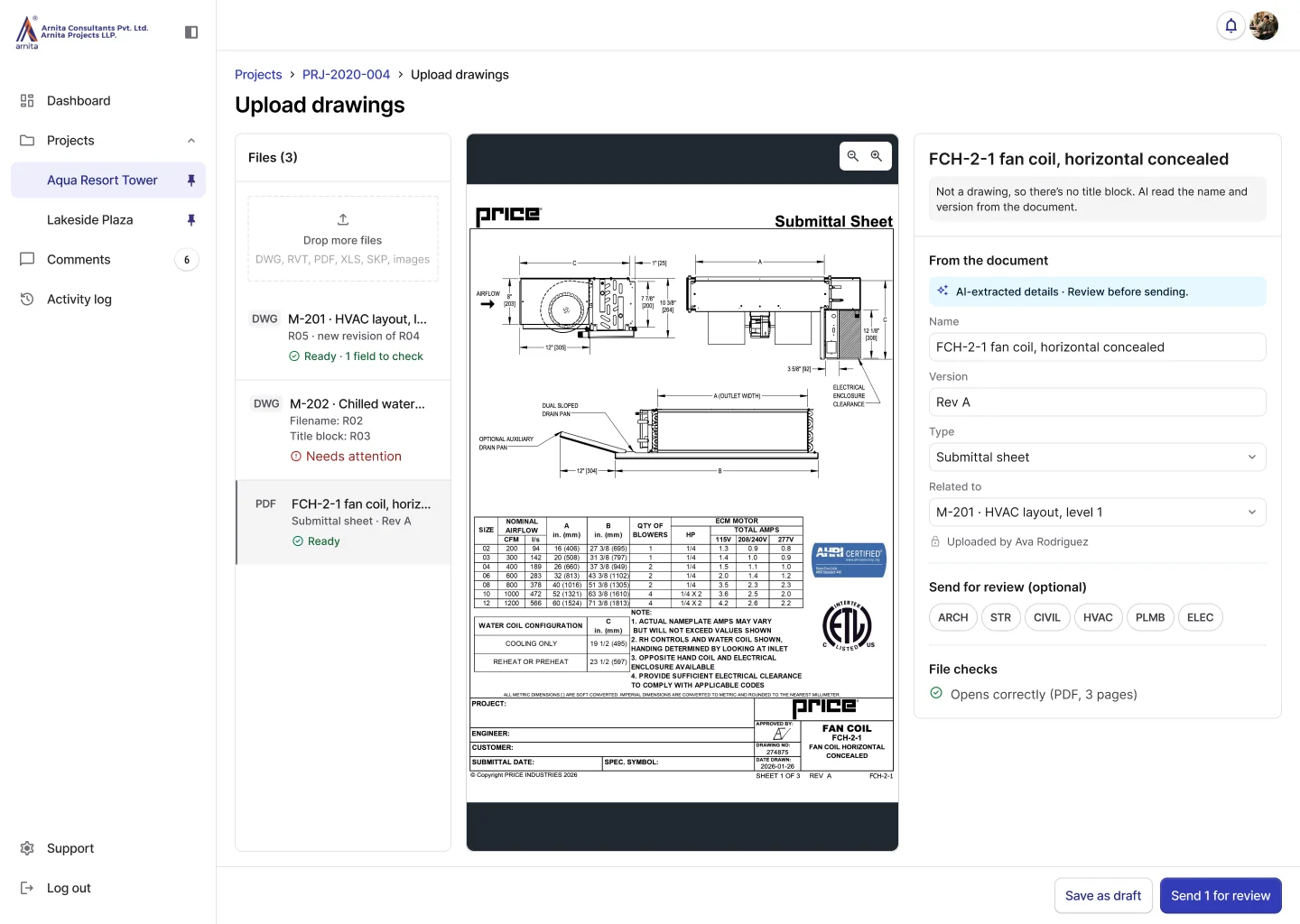
Upload page for M-202 where the file name says R02 and the title block says R03; the drafter picks which revision the file is
Upload page for a fan coil submittal sheet, with its name, version, type and related drawing filled in from the document

DRAWING FEEDBACK

Drawing annotations

Reviewers mark an area of the drawing and attach a comment to it, so feedback stays tied to a specific location and to the revision under review. Each comment carries a blocking setting, letting the reviewer decide whether it holds up approval.

Feedback for drafting

Browser annotations export as a separate DWG comment overlay, letting drafters reference feedback in AutoCAD. Comment status remains in the platform, where drafters mark items fixed.

Department leads pushed to keep commenting in AutoCAD by downloading, marking up and reuploading drawings. I showed the trade-off and demonstrated this handoff with a working prototype, which won them over.
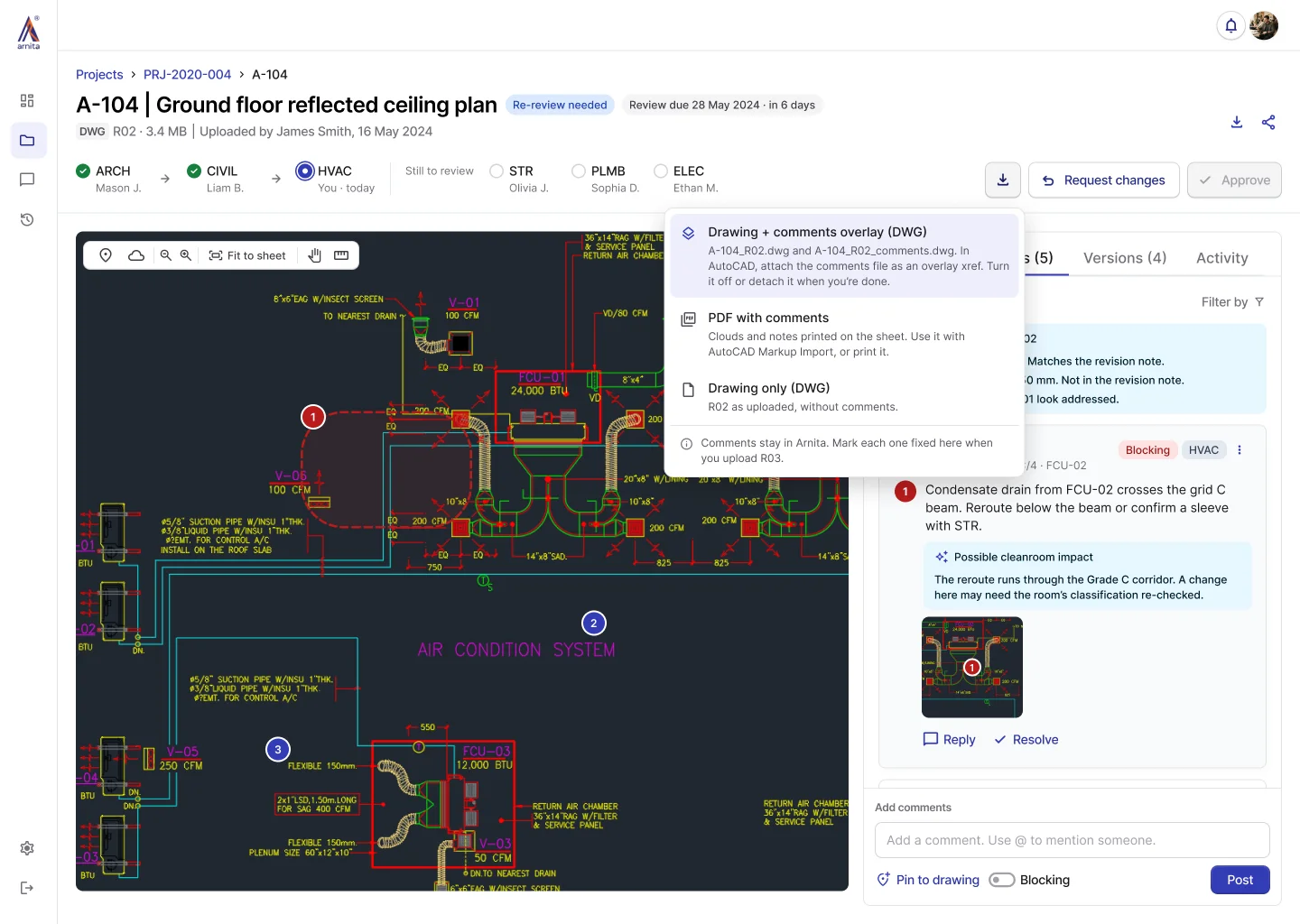
A-104 file view with the download menu open: the drawing plus a separate comments overlay DWG, a PDF with comments, or the drawing only

REVIEW DECISIONS

Change requests and approval

Approval stays disabled while the lead’s department has open blocking comments. The change-request dialog combines an editable AI summary with recipient selection, helping reviewers hand off feedback without AI prescribing fixes.
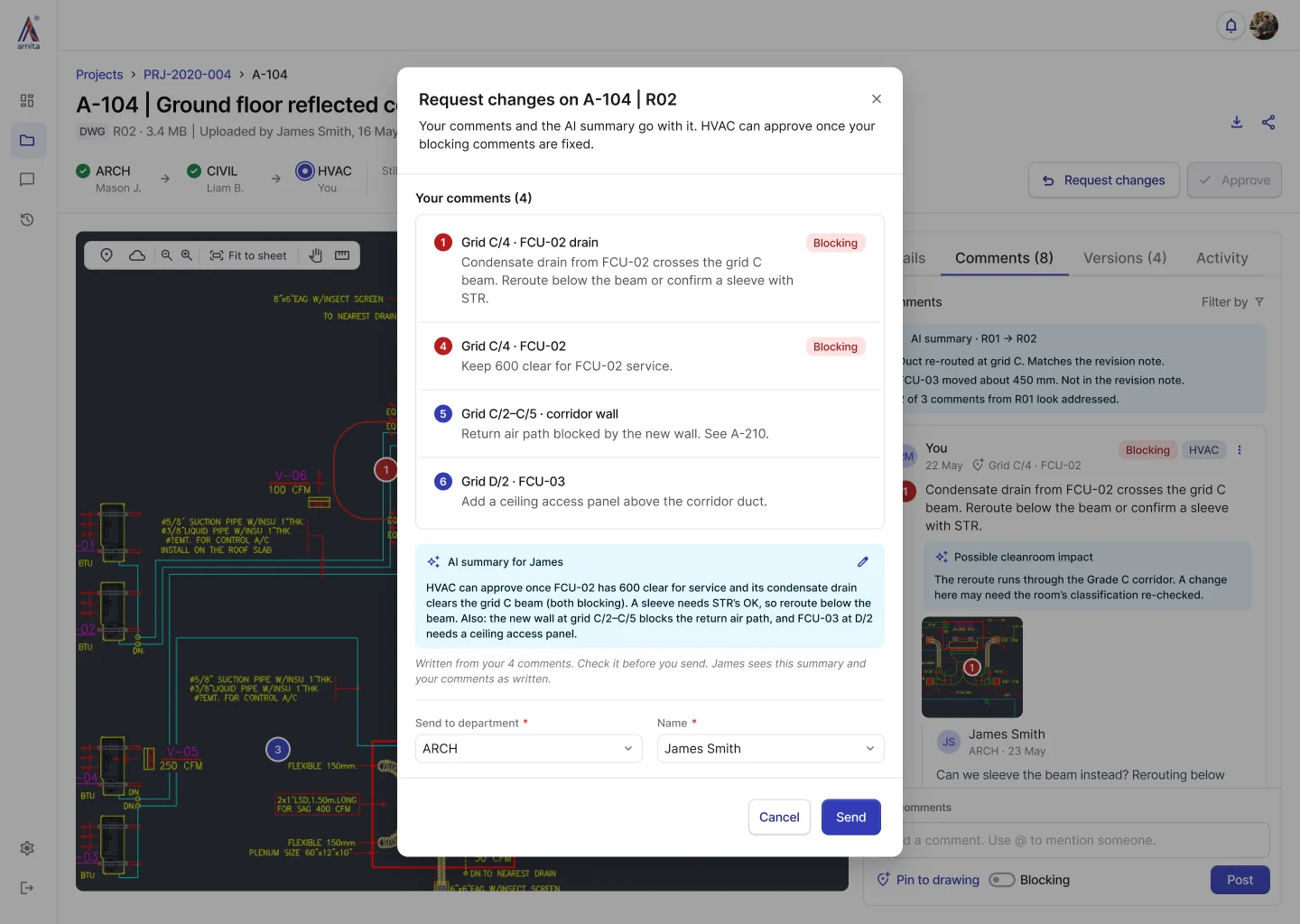
Request changes dialog for A-104 R02 listing the reviewer's comments, an editable AI summary for the drafter, and fields to choose the department and person it goes to

REVISION MANAGEMENT

Revision comparison

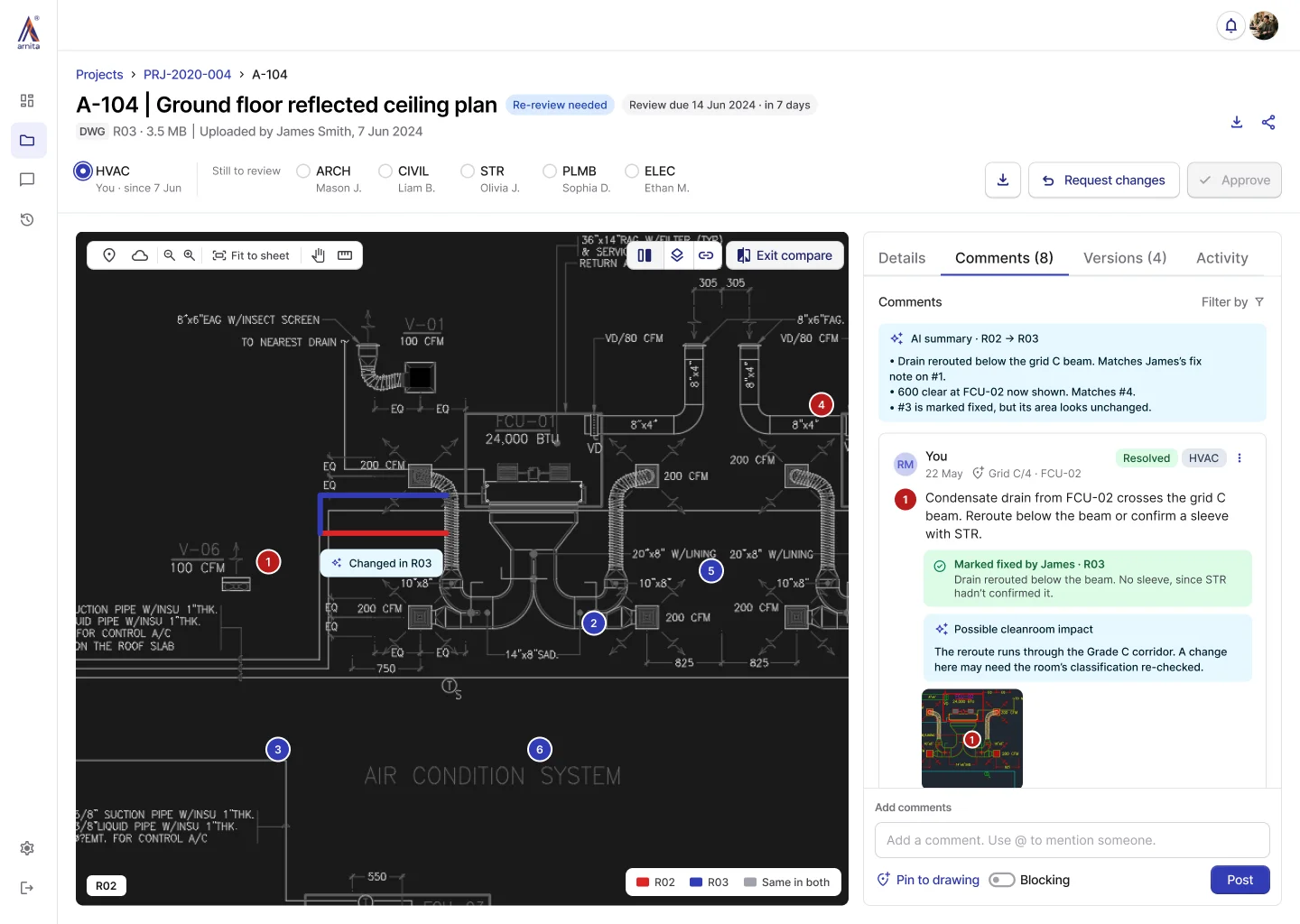
Synchronized side-by-side views and a revision overlay keep earlier comments visible next to what changed. When drafters upload a revision, they mark each comment fixed or not fixed, and AI highlights the changed areas, so reviewers can check the revision against its feedback.

The lead or uploader still decides whether each comment is resolved.
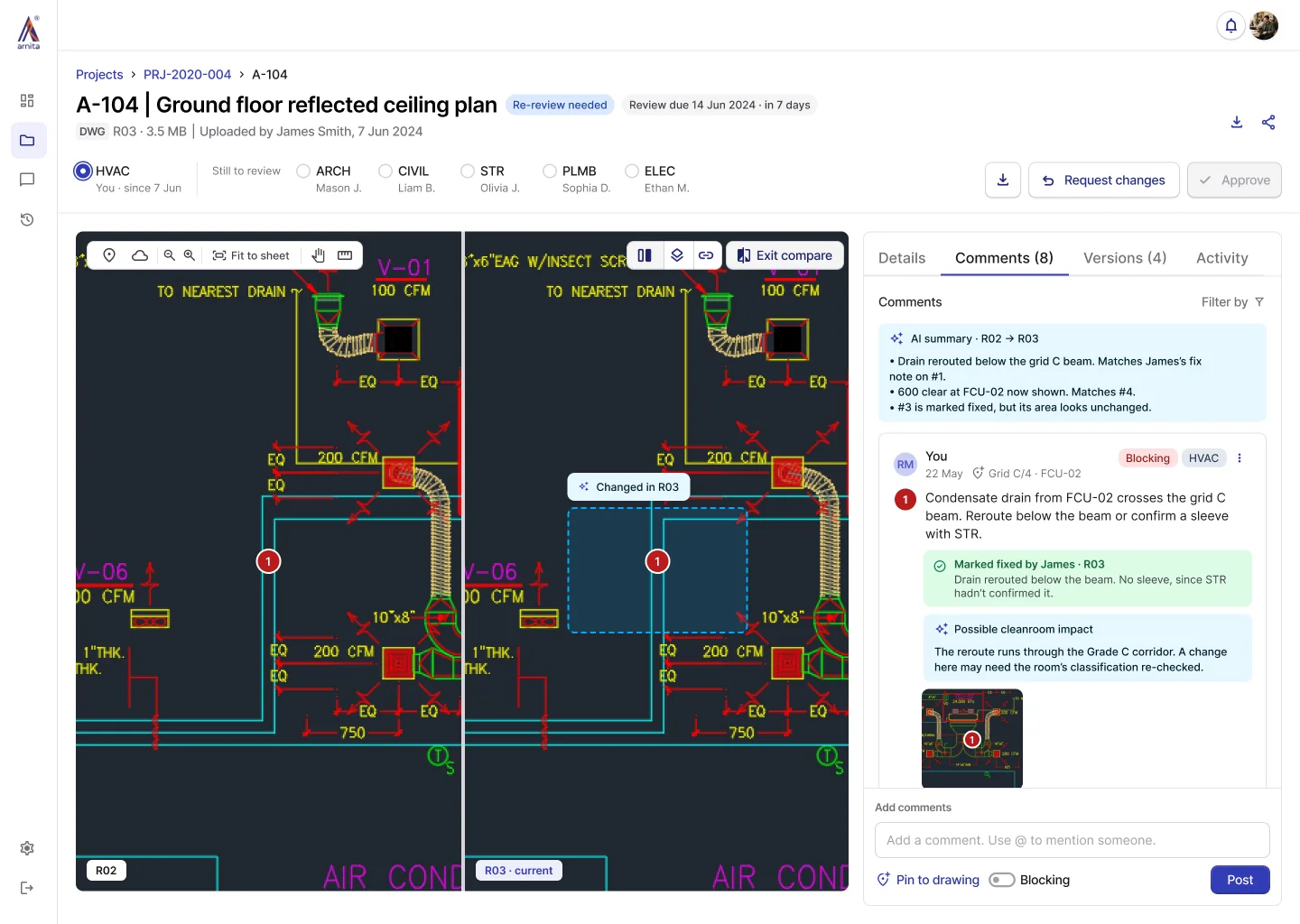
R02 and R03 of A-104 side by side with the changed area marked, next to the comments
Overlay of A-104 with R02 in red, R03 in blue and unchanged lines in grey, next to the comments
Impact

Review cycles went from 3–4 weeks to 5–7 days.

I trained the departments at rollout.

4 out of 6

Departments adopted within 2 weeks of launch.

180 hours

Recovered per month, across six departments.

5–7 days

Review cycles, down from 3–4 weeks.

~80%

Review requests captured entirely in-platform.

After launch

Extending support beyond the review workflow

After launch, we explored four additions to support drafting, follow-ups and document retrieval.

  • AutoCAD pluginSync comment status between CAD and the platform.
  • Review remindersFollow up on delayed reviews.
  • Drawing registerManage finalized drawings issued to contractors.
  • Cross-project searchFind drawings, comments and past project records.
Reflection

What I learned about adoption, decisions and validation

Trust starts with a shared understanding of the problem

Using teams’ own files and review examples helped build trust in changing established habits. Now I ground stakeholder alignment in problems people recognize before discussing solutions.

Document why decisions were made

As the sole designer, I held much of the project context. I learned to record trade-offs and constraints alongside design decisions so stakeholders and engineers could understand and revisit the reasoning.

Known constraints still need user validation

I flagged the comparison view’s zoom limitation but didn’t test it early with HVAC, which contributed to launch-week friction. Next time, I’d test a constraint first with the teams it affects most.